Schedule that does the maths
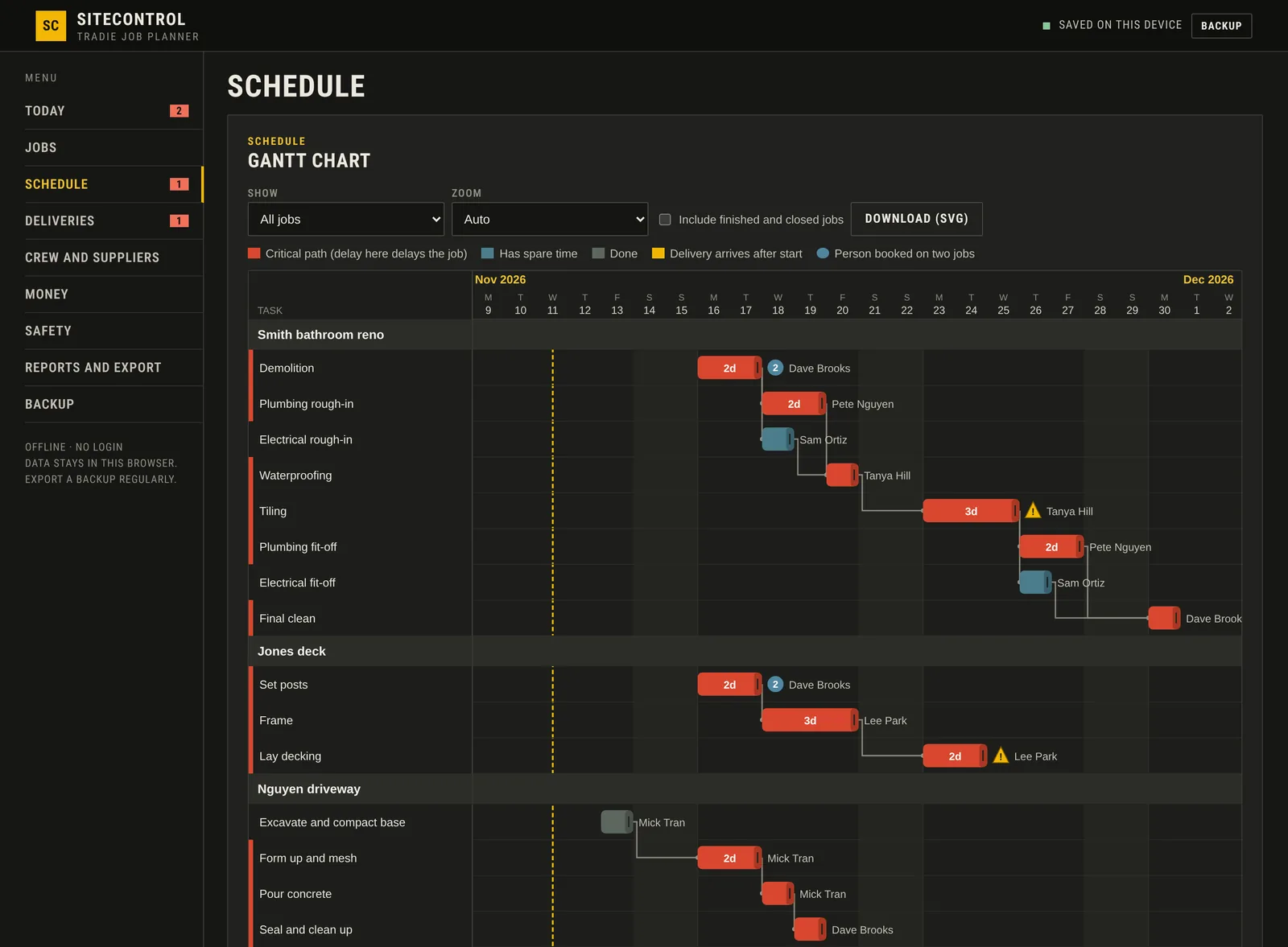
Give each task a duration in working days and link it to the tasks it has to wait for. SiteControl works out the dates, the critical path and the spare time on each task, and shows it all on a Gantt chart.
A simple job planner for trade businesses. Only $10, one-off. No login, no subscription.
Made for small trade crews of two to ten. Runs in your browser from one file on your computer. Nothing is uploaded.
30-day guarantee: if it doesn’t do what it says, reply to your receipt and we’ll refund you.
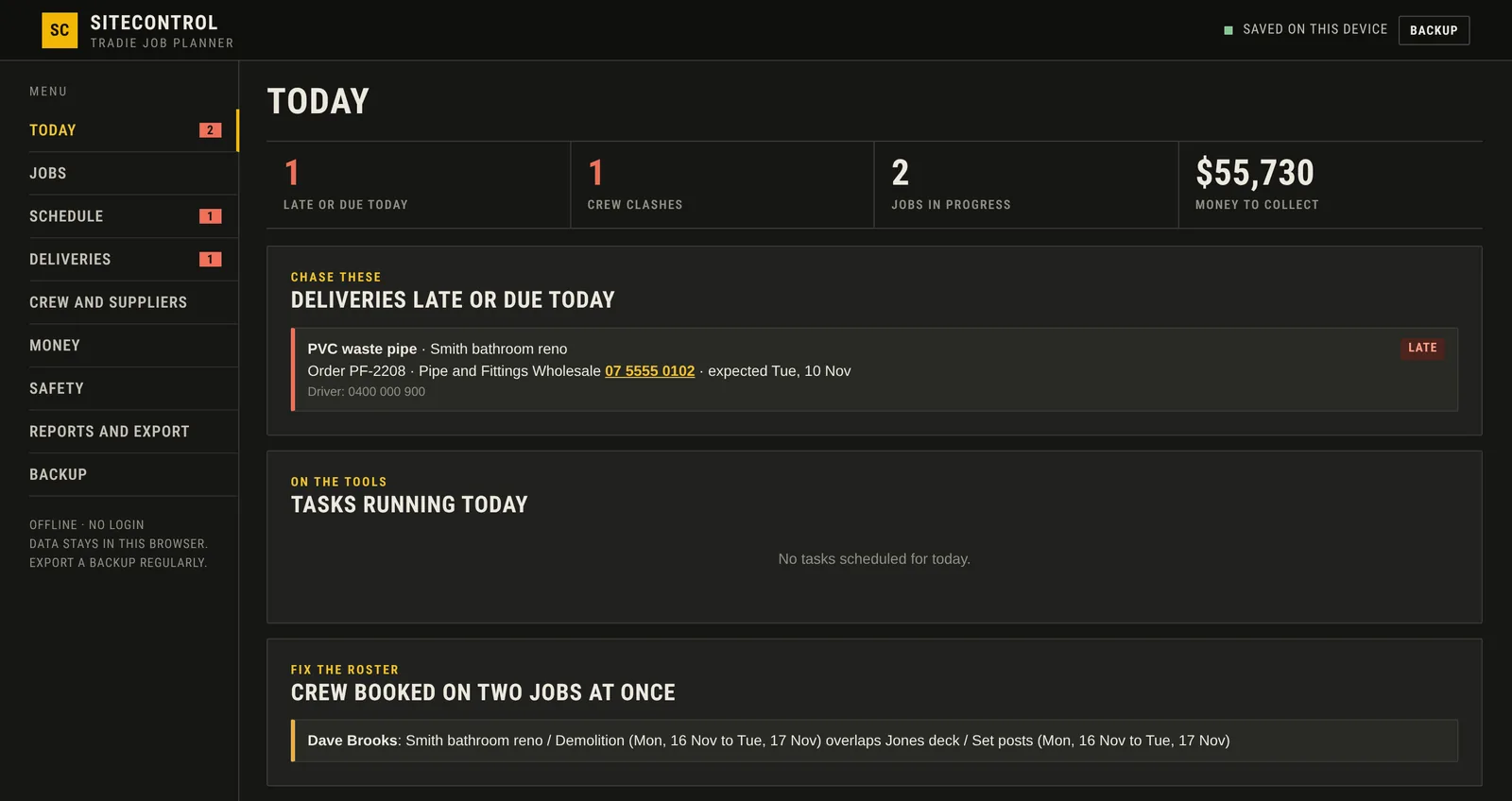
Open the file and start. The Today screen shows late deliveries, crew clashes and money to collect, and one click takes you to the item. Light and dark themes follow your computer’s setting.
Give each task a duration in working days and link it to the tasks it has to wait for. SiteControl works out the dates, the critical path and the spare time on each task, and shows it all on a Gantt chart.
Assign crew and subbies to tasks. If one person is booked on two jobs at the same time, both tasks are flagged, so you can sort it before the day.
Record the item, supplier, order number and expected date, and link it to the task that needs it. If the materials will turn up after the work starts, you get a warning.
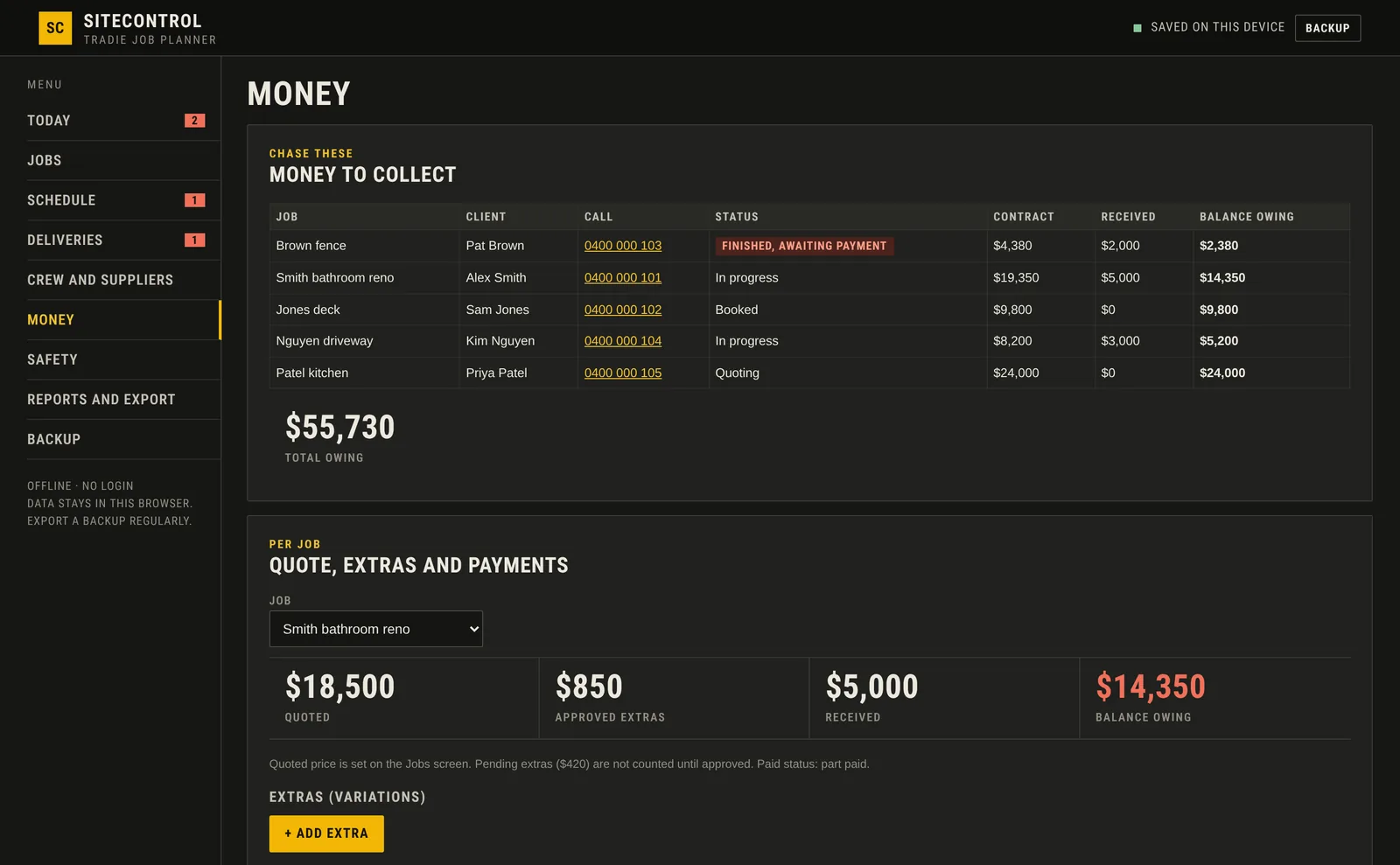
Record the quote, extras and payments for every job. The balance owing is worked out for you, and the Today screen shows what is still to collect.
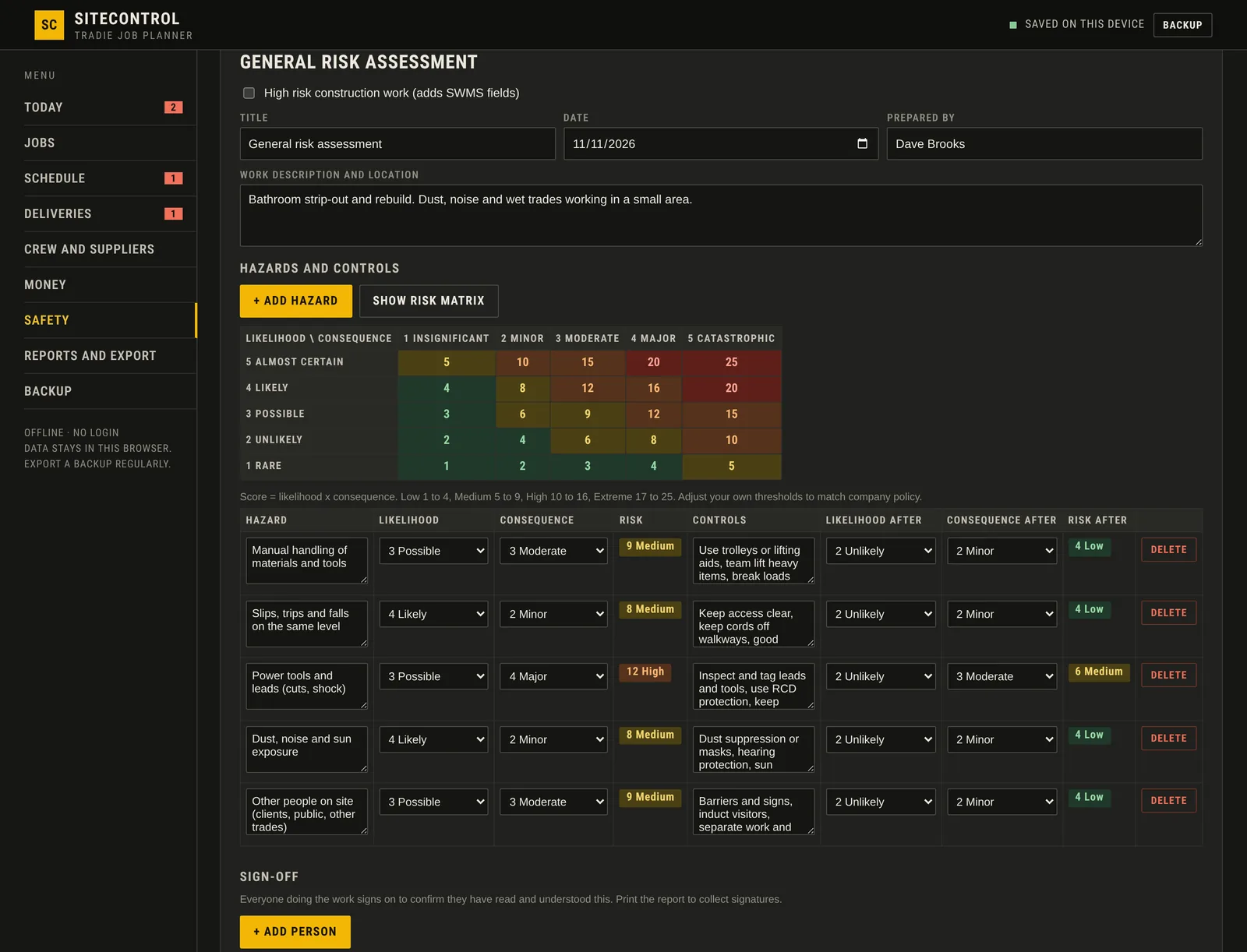
Risk assessments and SWMS from starter templates for heights, excavation, powerlines, asbestos and confined space. Edit them to suit the site, then print or save as PDF.
Keep the Gantt as an Excel workbook and each SWMS as a Word document in your own folder. Edit either side and the changes sync both ways. Needs Chrome or Edge on a computer.
Build a quote from standard items, kits and coatings, with allowances, discount, deposit and GST. Preview it, then print or save as PDF. Mark a quote Sent to set a follow-up date. Quotes due for chase show on Today.
Price extra work as a variation and record the client’s sign-off. Raise a progress claim by stage, with retention and GST worked out for you, then print a client progress report or use a Xero CSV to export claims and import payments.
These shots use the example data that comes with the app, not a live job.
SiteControl is one HTML file. No account to create and no subscription to keep up.
Buy on Payhip and download the ZIP. It has the app (index.html), a START-HERE guide and a plain-language licence.
Unzip the folder somewhere on your computer, such as Documents.
Open it in Chrome or Edge on your computer for the full set, including Excel and Word folder sync. Firefox and Safari work too, with download and import instead of folder sync.
Try it out with the example data, or start straight in with your own job. Back up from the Files tab, or choose a data folder to keep everything there.
Straight answers about how it works and what it does not do.
Yes. Durations are in working days and weekends are skipped. Link each task to the ones it has to wait for and SiteControl works out the dates, the critical path and the float. The critical path shows in red on the Gantt. Links are finish-to-start only, and public holidays are not counted.
On your computer. There is no login, no cloud account and nothing is uploaded. Without a data folder, jobs are saved in the browser on that computer, so download a full backup regularly and keep it somewhere safe. Clearing browser data, using a private window or changing computers can lose saved jobs.
In Chrome or Edge on a computer, choose a folder and SiteControl keeps the Gantt as an Excel workbook and each SWMS as a Word document. Edit either side and the changes flow both ways. In other browsers you can download a file, edit it and import it back.
It is built for whoever runs the office side. Plan jobs on a computer, then send reports and calendar files to the crew. The Today screen also works in a phone browser, but there is no phone sync, so anything entered on a phone stays on that phone.
Version 2 is a different tool aimed at trade crews. Your 1.2 file keeps working. 1.2 backups cannot be restored into version 2.
No. It is a recording and planning tool, not legal, safety, engineering or financial advice. Safety templates are starting points and do not replace your duties under work health and safety law. Check requirements with WorkSafe Queensland or your state regulator.
SiteControl comes with a 30-day guarantee. If it doesn’t do what it says, reply to your receipt or email [email protected] within 30 days and we’ll refund you. This doesn’t limit your rights under Australian Consumer Law.
For use by the buyer and their business. The download has the app, a START-HERE guide and a plain-language licence. No login and no subscription.
30-day guarantee: if it doesn’t do what it says, reply to your receipt and we’ll refund you.
Schedule limitsWeekends are skipped and public holidays are not counted. Links are finish-to-start only. The critical path and float are worked out for you, but nothing in the schedule or the deliveries moves on its own.
Your dataData stays on your computer. There is no cloud account and no phone sync. Excel and Word folder sync needs Chrome or Edge on a computer. Download backups regularly.
Not adviceSiteControl is not legal, safety, engineering or financial advice. Safety templates are starting points only and do not replace your duties under work health and safety law. Check requirements with WorkSafe Queensland or your state regulator.
The SiteControl app runs in your browser after you download it. It does not create an account and it does not upload or sync job records to any online service. Your data stays on your computer, either in the browser or in a data folder you choose. Download a full backup regularly, because clearing browser data may remove records.
This website does not sign you in and does not collect job data.
Purchases are processed by Payhip. Payhip handles payment, delivery of the download, and receipts. See Payhip’s own terms and privacy policy for how it handles payment information.
The website is hosted on Cloudflare Pages. The host may set a technical cookie (for example a bot-management cookie) in order to serve and protect the site.
For a question about the product, email [email protected].
SiteControl comes with a 30-day guarantee. If it doesn’t do what it says, reply to your receipt or email [email protected] within 30 days and we’ll refund you. This doesn’t limit your rights under Australian Consumer Law.
Buying SiteControl lets the buyer and their business use that copy for their own work. You may keep backup copies for your own use. You may not resell, share or redistribute the app. The download includes the app, the START-HERE guide and a plain-language licence.
SiteControl is a recording and planning tool. It is not legal, safety, engineering or financial advice. Safety templates are general starting points and do not replace your duties under work health and safety law. It does not replace formal notices, approvals or professional judgement.
These notes describe the current setup. They are not legal advice.